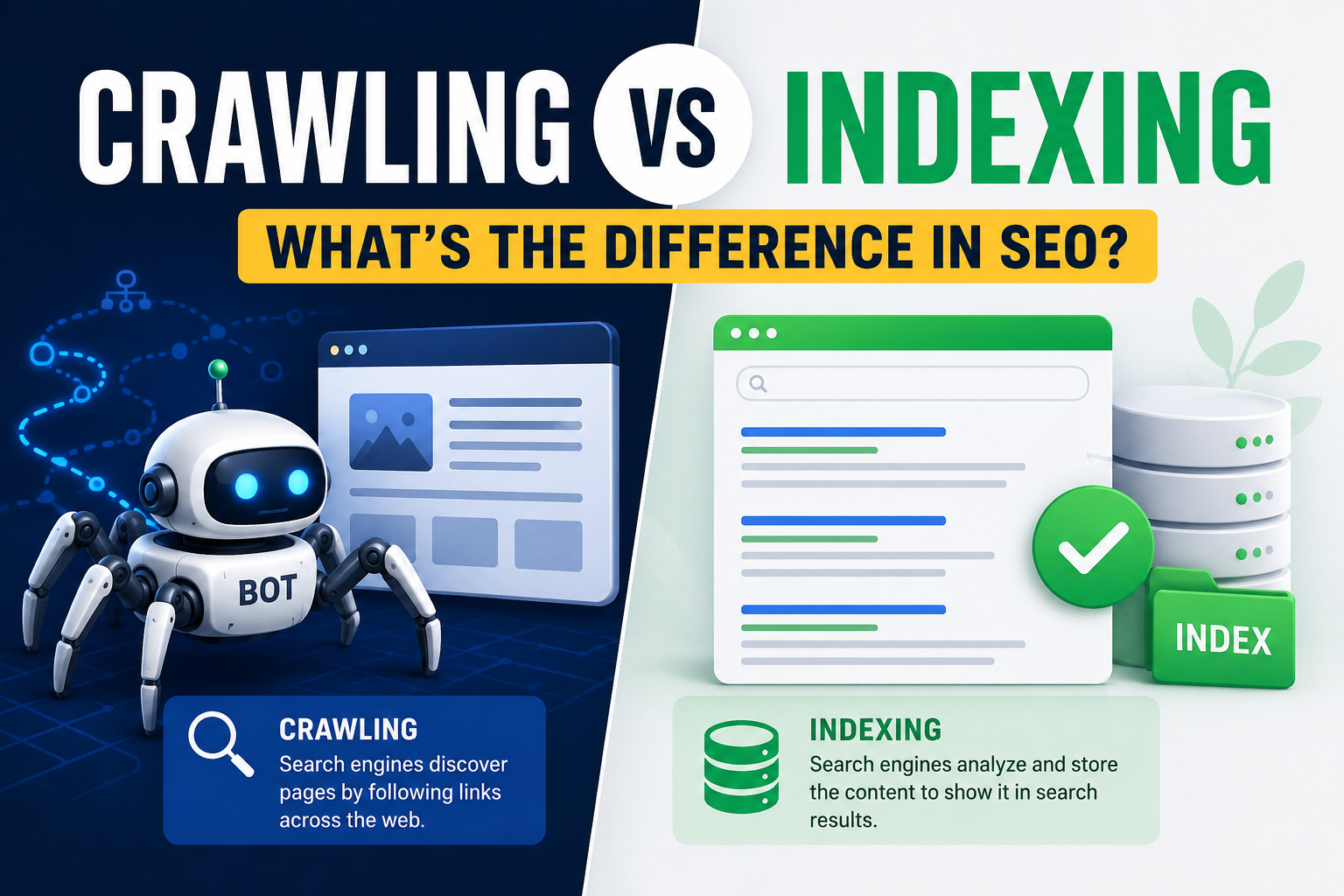
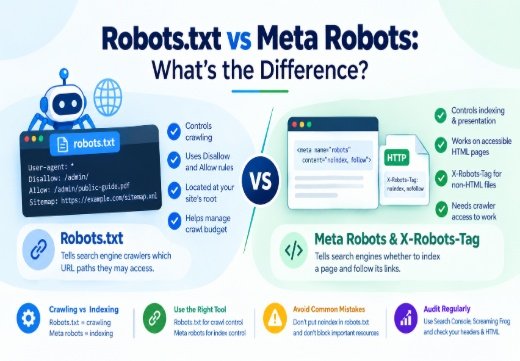
Crawling comes before indexing, but crawling does not guarantee indexation. Google can discover a URL through internal links, external links, an XML sitemap, or another source. Googlebot may then fetch the page and render its JavaScript. Google still decides whether the page is useful, accessible, original, and suitable for the index.
A simple workflow is discover, fetch, render, analyze, store, and retrieve. Search engines repeat this process when they find new URLs or detect that existing website content has changed. A page must be accessible to the crawler and eligible for the index before it can appear in the search engine results pages (SERPs). Indexing alone does not guarantee a high ranking.
How Googlebot Crawling Works Behind the Scene
Googlebot is Google’s automated crawler. Google Search processes JavaScript websites through three main phases: crawling, rendering, and indexing. Googlebot takes a URL from a crawl queue, fetches the response, extracts links, renders eligible pages when needed, and sends the resulting information for indexing.
URL Discovery
URL discovery is the first stage of crawling. Googlebot finds URLs in several ways. It can follow an internal link from a page that Google already knows. It can find an external link on another website. It can read URLs in an XML sitemap. It can discover a URL after a redirect or while processing rendered HTML.
Internal links are one of the clearest discovery signals; they show how pages relate to one another. A new article linked from a relevant, crawlable category page is easier for search engine crawlers to find than an article with no links pointing to it. Google can usually discover most important pages when a site has a complete internal linking structure.
An XML sitemap gives Google a list of URLs that a site owner considers important. The sitemap can include modification dates and information about specialized content, such as images, videos, or news articles. A sitemap supports discovery, but it does not force Google to crawl or index every listed URL.
Fetching
After Googlebot discovers a URL, it requests the page from the server. Fetching can involve the main HTML document, images, style sheets, JavaScript files, fonts, and other resources that help the crawler understand the page.
The server should return an appropriate HTTP status code. A 200 response normally indicates a page that can be processed. A 404 response indicates that a resource was not found. A 410 response signals that a resource has been permanently removed. A 301 or 308 redirect points the crawler to another URL. Server errors such as 500 and rate-limiting responses such as 429 can reduce Google’s crawl activity.
A page can be technically available to a human visitor and still create fetching problems for Googlebot. Common causes include slow server response times, intermittent downtime, blocked resources, redirect chains, authentication requirements, and an application that returns different content to different user agents. Reviewing server logs and the URL Inspection tool in Google Search Console (GSC) can help identify these issues.
Rendering
Rendering is the stage in which Google processes the page’s client-side content. Google uses an evergreen version of Chromium to run JavaScript for Google Search. Googlebot first parses the initial HTML and later queues eligible pages for rendering. The rendered HTML can reveal content and links that did not exist in the original server response.
JavaScript rendering matters when the initial HTML contains only an application shell and the main text appears after scripts run. Important content should remain available in rendered HTML. Server-side rendering or pre-rendering can reduce processing work, improve page speed, and help crawlers that cannot run JavaScript.
A JavaScript site should use standard HTML links with an href attribute, return meaningful HTTP status codes, keep important content visible after rendering, and avoid changing the canonical URL to a conflicting value. A page that loads correctly in a browser can still have a rendering problem if Googlebot cannot access a script, waits for an API response that fails, or receives a different page state.
How Robots.txt and Sitemaps Guide Crawling
A robots.txt file tells search engine crawlers which URLs they may access. Its main purpose is to manage crawler traffic and prevent requests for pages or resources that a site does not want crawled.
For example:
User-agent: *
Disallow: /private-folder/
Sitemap: https://www.example.com/sitemap.xml
The User-agent line identifies the crawler group. The asterisk targets all crawlers. The Disallow line blocks matching paths from crawling. The Sitemap line identifies the XML sitemap location.
Do not use robots.txt as a substitute for noindex. Google may still index a disallowed URL if it finds the URL through links or other public information, while Googlebot cannot fetch the page content. Use password protection for private material. Use a noindex meta tag or an X-Robots-Tag HTTP header when a crawlable page should stay out of Google Search.
A page must be accessible to Googlebot for Google to see a noindex directive. Blocking the page in robots.txt prevents the crawler from reading that directive. This creates a common configuration error: the owner wants to remove a page from search results but blocks the page before Google can process noindex.
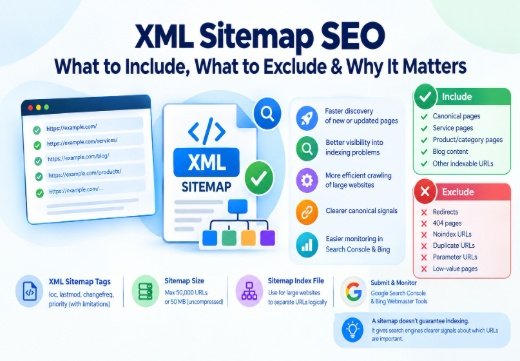
An XML sitemap lists important URLs and can include a <lastmod> value that indicates when the content last changed. Sitemaps help new, large, complex, media-heavy, and poorly linked websites. Search engines still assess each URL after discovery, so a sitemap does not guarantee indexation.
Keep only preferred, indexable URLs in the sitemap. Remove redirected URLs, broken URLs, duplicate variants, and pages that intentionally use noindex. Submit the sitemap in GSC and monitor the Page Indexing report for unexpected exclusions.
What Affects Crawl Efficiency and Frequency?
Google’s crawling activity depends on both the site’s ability to serve requests and Google’s demand for the site’s URLs. Google describes this combined allocation as crawl budget. Crawl budget matters most for very large sites, rapidly changing sites, or sites with many known URLs that remain undiscovered or unindexed.
Internal Linking Structure
Internal links connect related web pages within the same website. They help Googlebot discover URLs and help Google interpret site structure, topic relationships, and relative importance.
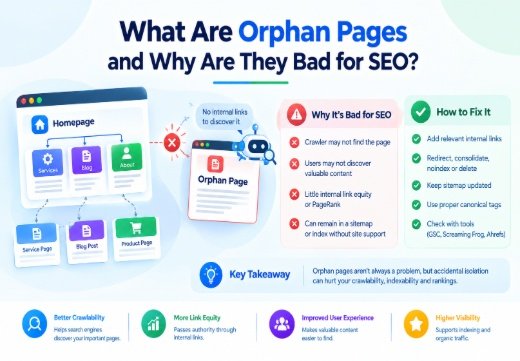
Link important pages from crawlable navigation, category pages, relevant articles, and other pages that already receive regular crawling. Use descriptive anchor text that identifies the destination. Do not hide important pages behind forms, unsupported scripts, or a long sequence of clicks. Fix orphan pages that have no internal links pointing to them.
Link to the preferred canonical URL. Linking to multiple URL versions can create duplicate discovery paths and make canonicalization less clear. A clean structure reduces the number of URLs that crawlers must process.
Site Speed
Site speed affects how efficiently Googlebot can fetch and render website content. Slow responses, high latency, unstable hosting, and server errors can lower the site’s crawl capacity limit. Google may reduce crawling when a site responds slowly or returns repeated 5xx or 429 responses.
Improve the server response time, compress appropriate resources, remove unnecessary scripts, use caching, and monitor uptime. Use a content delivery network when it fits the site’s architecture. Google recommends supporting 304 Not Modified responses when a resource has not changed, since the response can reduce unnecessary data transfer.
Speed does not make a page indexable by itself. A fast page with thin or duplicate content can remain out of the index. Speed helps when it removes a technical barrier to fetching, rendering, and user access.
Crawl Budget
Crawl budget is the set of URLs that Google can and wants to crawl for a site. Crawl capacity reflects what the server can handle. Crawl demand reflects factors such as URL popularity, update frequency, freshness, quality, relevance, and the number of URLs Google knows about.
Most small websites do not need to calculate a daily crawl budget. A current sitemap, strong internal links, stable hosting, and the Page Indexing report are usually enough. Large ecommerce sites, publisher websites, marketplaces, and sites with millions of URL variants need closer control.
Reduce crawl waste by consolidating duplicate URLs, managing filters and parameters, returning 404 or 410 for permanently removed pages, eliminating soft 404 pages, shortening redirect chains, and keeping low-value URL variations out of the crawl path. Do not block pages temporarily with the expectation that Google will automatically transfer that crawl capacity to other pages.
Indexing in SEO: How Pages Get Stored and Ranked
Indexing in SEO is the process of analyzing a crawled page and storing information about that page in the search engine index. Google evaluates the page’s text, links, media, technical signals, language, location, duplicate relationships, and other information before deciding how the page can be used in Search.
The search engine index is not a complete copy of every URL on the web. Google does not promise to index every discovered or crawled page. The main objective for a site owner is to get the preferred, high-quality version of each important page indexed. Duplicate and alternate URLs often should remain outside the index.
Indexing makes a page eligible for retrieval, but eligibility does not guarantee a position in the SERPs. Ranking depends on the query, relevance, content quality, competition, page experience, links, and many other systems. A page can be indexed and still receive no meaningful impressions.
What Happens During Indexing in SEO?
During indexing, Google analyzes the content that it received from the page and, when applicable, the rendered HTML. Google identifies duplicate or very similar URLs and selects a canonical URL for the group. A canonical URL is the preferred version that represents the content in search results.
Site owners can send canonicalization signals through redirects, a rel=”canonical” link element, and sitemap inclusion. Redirects and canonical link elements are strong signals. Sitemap inclusion is a weaker signal. These signals should point to the same URL, and internal links should use the preferred version.
Google checks whether indexing is allowed. A page with <meta name=”robots” content=”noindex”> or an equivalent X-Robots-Tag: noindex header should not appear in Google Search after Google processes the directive. The page must remain crawlable for Googlebot to see the instruction.
Google stores information about pages it considers suitable for its index. When a person searches, Google retrieves and ranks relevant indexed documents for the query. The stored data can include the page’s content, title, links, canonical relationship, language, and other signals.
Why Some Pages Aren’t Indexed (Even After Crawling )
A page can be crawled and remain unindexed for several valid reasons:
- The page uses noindex. Remove the meta tag or HTTP header when the page should appear in Google Search.
- The page is a duplicate. Use consistent canonical signals when another URL is the preferred version.
- The content provides limited value. Rewrite pages that are thin, copied, outdated, or substantially similar to other pages.
- The page returns an error or soft 404. Return the correct status code and make sure a real page does not look empty or unavailable.
- The page has rendering problems. Make important content available in the rendered HTML and check blocked scripts, failed API requests, and client-side routing.
- The URL is not a priority for Google. Google may know about a URL but postpone crawling or indexing it, especially when a site has many low-value or duplicate URLs.
Use the Page Indexing report and URL Inspection tool to distinguish a technical problem from a normal exclusion. Not every excluded URL needs a fix. A filtered product URL, a login page, a duplicate print page, or an internal search URL may correctly stay out of the index.
The “Discovered — Currently Not Indexed” Status Explained
“Discovered – currently not indexed” means Google knows about the URL but has not crawled it yet. Google’s documentation says this status commonly appears when Google expected crawling the URL to overload the site and rescheduled the crawl.
This status differs from “Crawled – currently not indexed.” The latter means Google fetched the page but did not add it to the index. The former usually means the page has not received a completed crawl, so the Page Indexing report may not show a last crawl date.
Start with the page’s importance. Confirm that the URL belongs in search results, add an internal link from a relevant page, include the canonical URL in the sitemap, remove accidental crawl blocks, and check the server’s response time. Improve the page when it offers little distinct value compared with other URLs. Request indexing through the URL Inspection tool after making a meaningful fix, but do not treat the request as a guarantee.
A large number of discovered but uncrawled URLs can indicate an oversized URL inventory, weak internal links, slow hosting, repeated server errors, excessive parameters, or low demand for the site’s content. Address the site-wide cause rather than submitting every URL repeatedly.
How to Get Indexed Faster
There is no method that guarantees immediate indexation. Google states that new content can take days to be indexed, and requesting indexing may reduce the lag but does not guarantee a result.
Use these steps when a valuable page needs attention:
Publish original content that answers a clear search need and adds information that other pages do not provide.
- Link to the page from relevant, crawlable pages on the site.
- Add the preferred canonical URL to an accurate XML sitemap.
- Confirm that robots.txt does not block the page or its important resources
- Remove accidental noindex directives.
- Confirm that the server returns a stable 200 response and that the page works without authentication.
- Test the rendered page in GSC when JavaScript supplies the main content.
- Request indexing through URL Inspection after the page is ready.
External links can help Google discover a page, but a backlink does not guarantee faster crawling or indexation. IndexNow can notify participating search engines about added, updated, or deleted URLs. The protocol confirms that a participating search engine received the notification; it does not guarantee that the URL will be crawled, indexed, or ranked.
Indexing Issues and Troubleshooting: How to Fix Common Problems
Begin with the exact status in GSC instead of changing several technical settings at once. Inspect the live URL and compare the live result with the last crawled version.
When the report shows “URL blocked by robots.txt,” review the matching rule and remove the block when the page should be crawled. When the report shows “URL marked noindex,” remove the directive if indexation is intended. When the report shows “Crawled – currently not indexed,” improve the page’s distinct value, canonical signals, internal links, and technical delivery before requesting another review.
For a server error, check hosting logs, uptime, response time, firewall rules, and rate limiting. For a soft 404, return a real 404 or 410 for a removed page, or provide complete content and a 200 response for a valid page. For a duplicate without a user-selected canonical, choose a preferred URL only when the pages are genuinely duplicates or near-duplicates. For a redirect error, remove loops and long chains.
Check JavaScript when the source HTML lacks the main content. Check canonical tags when Google selects a different URL from the one declared by the site. Check the sitemap when it contains redirected, blocked, duplicate, or noindex URLs. After each fix, allow Google to recrawl the page and use validation in GSC when the report offers that option.
Why are Crawling and Indexing Important for SEO?
Crawling and indexing determine whether search engines can find, process, and retrieve a site’s content. A page cannot earn organic visibility when Google cannot discover it, cannot fetch it, or excludes it from the search engine index.
Good crawlability helps Google find new and updated web pages. Good indexability helps Google interpret the pages and select the right URL for search results. These conditions support visibility, but they do not replace useful content, clear relevance, or a sound search strategy.
What Happens During Indexing in SEO?
Indexing turns fetched website content into information that Google can evaluate for search. Google processes the page, checks indexing rules, identifies duplicates, and records signals about the canonical version. This lets the search engine retrieve a suitable page when a user’s query matches its content.
The practical SEO benefit is coverage of the pages that matter. A product page, service page, article, or location page must be in the index before it can compete for a related query. Indexing a duplicate URL instead of the preferred URL can split reporting and create inconsistent search results.
Why Some Pages Aren’t Indexed (Even After Crawling)
A non-indexed page can represent a technical defect or an intentional exclusion. A private account page should not be indexed. A duplicate tracking URL does not need a separate search listing. A high-value article with a mistaken noindex tag needs correction.
The distinction prevents wasted work. Review the page’s business purpose, search intent, canonical status, content quality, rendering, status code, and internal links. Fix pages that should rank. Leave legitimate exclusions alone.
The “Discovered — Currently Not Indexed” Status Explained
The status identifies a gap before page processing is complete. Google knows the URL, but the page has not yet gone through a completed crawl. A weak link structure, slow site, oversized URL inventory, or repeated server load problem can delay that step.
Prioritize important URLs. Link to them from relevant pages, remove unnecessary URL variants, improve server reliability, and keep the sitemap accurate. Treat the status as a diagnostic clue, not as proof that Google rejected the page’s content.
How to Get Indexed Faster
Indexation improves when Google can find a clear, stable, useful, and accessible URL. Publish the page in the correct location, link to it from relevant content, include it in the sitemap, maintain consistent canonical signals, and remove technical blocks. Use URL Inspection after the page is ready.
These actions reduce preventable delay. They do not control Google’s crawl schedule or guarantee a search position. Search Console’s Page Indexing report remains the best place to monitor the page’s current status.
Indexing Issues and Troubleshooting: How to Fix Common Problems
Troubleshooting works best when each issue has one test and one correction. Inspect the URL, check the server response, view the rendered HTML, confirm indexing rules, review the selected canonical, and compare the page with similar URLs.
Use the report’s issue descriptions to separate website-controlled problems from Google-controlled processing decisions. Correct robots rules, noindex tags, server failures, duplicate signals, broken links, and poor page delivery first. Then wait for a new crawl rather than repeatedly submitting the same unchanged URL.
10 Tips to Improve Your Site’s Crawlability and Indexability
The following ten practices address URL discovery, crawl efficiency, page processing, and index control. Apply them to the pages that should appear in search results.
Start with Site Architecture
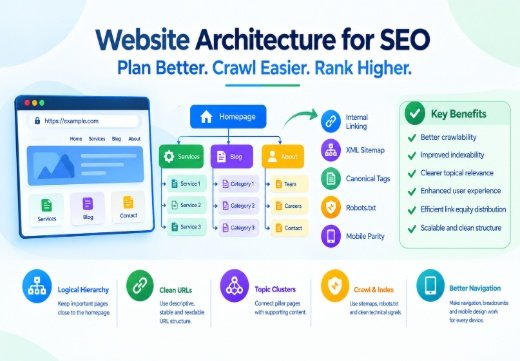
Create a logical hierarchy for topics, categories, services, products, and articles. Keep important pages reachable through navigation and relevant internal links. Use descriptive, stable URLs and avoid unnecessary folder depth. A clear architecture helps users and search engine crawlers understand how web pages relate to one another.
2. Optimize Your Robots.txt File
Use robots.txt to control crawler access to low-value or resource-intensive URL patterns. Test rules before publishing them. Do not block a page when Google needs to crawl it to see a noindex tag, and do not use robots.txt to protect confidential information.
3. Don’t Forget Your XML Sitemaps
Maintain an XML sitemap that lists the canonical, indexable URLs you want search engines to discover. Include accurate modification dates for changed content. Remove redirects, errors, duplicate variants, and noindex pages. Submit the sitemap in GSC and review the submitted-versus-indexed pattern.
4. Implement Schema Markup
Use valid structured data to describe entities such as articles, products, organizations, local businesses, events, breadcrumbs, and reviews when the markup matches visible page content. Schema markup can help search engines interpret a page and may make the page eligible for supported rich results. It does not guarantee a rich result, better rankings, or indexation.
Test structured data with Google’s Rich Results Test and monitor errors. Keep the markup accurate when the page changes.
5. Utilize Breadcrumbs
Breadcrumbs show the page’s position within the site hierarchy. Use visible breadcrumb navigation and, where appropriate, BreadcrumbList structured data. Link each breadcrumb to a valid, canonical URL. Breadcrumbs support navigation and give search engines more information about page relationships.
6. Leverage IndexNow
Use IndexNow when your site publishes frequent changes and the target search engines participate in the protocol. Submit added, updated, and deleted URLs through a verified key. Treat the notification as a discovery signal, not an indexation guarantee. IndexNow does not replace an XML sitemap, internal links, or content review.
7. Use the Query Arg Monitor to Eliminate Unnecessary Query Args
Audit URL parameters such as ?sort=price, ?filter=color, ?session=123, and tracking parameters. Some parameters create many URLs with the same content. Consolidate duplicates, link to clean canonical URLs, and prevent low-value variants from becoming a major part of the crawl path.
Do not remove a parameter until you understand its function. Product filters, pagination, language selection, and tracking systems can affect users and analytics. Use canonicalization, redirects, server rules, or carefully tested crawl controls for the correct case.
8. Manage Internal Site Search URLs
Internal search pages often create large numbers of thin, repetitive, or user-generated URLs. Review whether these pages provide standalone value. Keep them out of the index when they should not appear in search, and prevent spam patterns from creating unlimited URL combinations.
Do not block a URL in robots.txt when Google must see a noindex directive. For pages that should remain private or unavailable, use authentication or the correct server response.
9. Find and Fix Broken Links
Crawl the site regularly to find internal links that return 4xx or 5xx responses, redirect chains, and links to outdated URL versions. Update links to the current canonical URL. Redirect a moved page when a suitable replacement exists. Return 404 or 410 when the content is permanently gone and has no useful replacement.
Broken links can stop users and crawlers from reaching important pages. A clean link graph makes discovery more reliable.
10. Be Strategic with Internal Linking
Add contextual links from relevant, established pages to new or important content. Use descriptive anchor text and connect related pages in both directions when that helps users. Give priority to pages that support the site’s main topics and business goals.
Review internal links after URL changes, migrations, and content pruning. Remove links to duplicate, blocked, redirected, or noindex URLs when a canonical alternative is available.