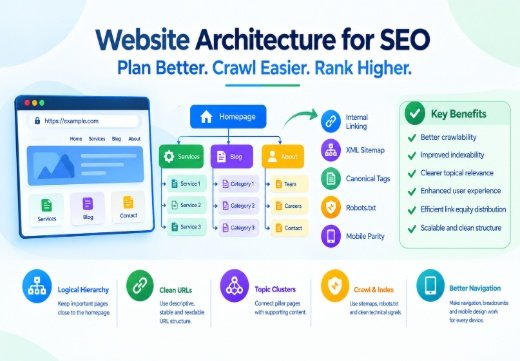
Website Architecture for SEO is the way your pages are organized, connected, and presented to users and search engines. A strong structure works because a logical hierarchy improves crawlability and helps Google understand page relationships; descriptive URLs and navigation clarify topics and user journeys; internal linking distributes link equity and connects pillar pages with supporting content; and clean technical signals, including XML sitemaps, canonical tags, robots.txt, and mobile parity, support indexability. The practical goal is a shallow, scalable site where important pages are reachable in a few meaningful steps.
What Is Website Architecture for SEO?
Architecture connects pages and topics
Website Architecture for SEO is the system that determines how a site’s pages are arranged and connected. It includes Information Architecture, Site Hierarchy, categories, menus, URL paths, contextual links, and technical controls. Users need to find information without confusion, while Google needs crawlable paths that reveal which pages are related and which pages matter most.
Why Website Architecture for SEO Affects SEO Performance
A logical structure supports Crawlability, Indexability, user experience, and topical clarity. It helps search engines discover pages and interpret their context.
Do not treat architecture as a guaranteed ranking factor or assume that a redesign automatically improves rankings. Google recommends logical organization without requiring one universal model.
Build a Logical Site Hierarchy and URL Structure
Keep important pages close to the homepage
Start with a clear Site Hierarchy: homepage, primary categories, subcategories, and individual service, product, or article pages. A shallow structure reduces Page Depth. A three- or four-click target is a useful planning benchmark, not a rigid Google rule.
Place high-value pages near the surface. Avoid empty category levels. Each category should have a clear purpose and links to the pages it represents. Ensure every important indexable page has a relevant internal link.
Use Descriptive, Stable URLs for Better Website Architecture for SEO
A clean URL Structure should be readable, consistent, and aligned with the page’s subject.
For example, /services/technical-seo/ communicates more than /page?id=4821.
Use meaningful words and a stable format. Avoid unnecessary parameters and frequent changes that require redirects.
Directories can organize large sites, but folders alone do not create topical authority. If a URL changes, redirect it and update internal links, canonical tags, and the XML sitemap.
Use Internal Linking and Topic Clusters
Connect pillar pages with supporting content
Internal Linking connects an SEO architecture. Use descriptive anchor text between a broad Pillar Page and closely related supporting pages. This Topic Cluster model groups content around a subject.
For example, a technical SEO pillar could link to pages about crawlability, indexing, canonicalization, and structured data. Each page should satisfy its own intent. Ahrefs and Moz describe clusters as a central page, related content, and links between them.
Internal links can help users discover content and may distribute Link Equity. Prioritize context over volume and avoid unrelated links or forced exact-match anchors.
Support Crawlability and Indexability
Use sitemaps and robots.txt correctly
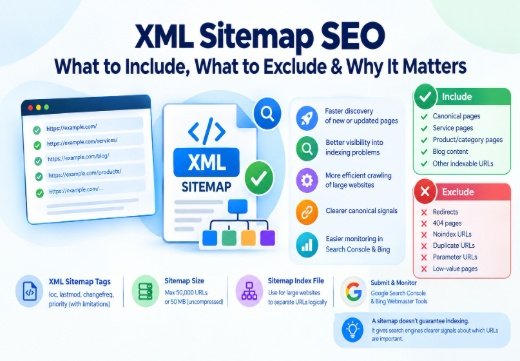
An XML Sitemap SEO gives Google information about important URLs and their relationships. It is especially useful for large, new, complex, or media-heavy sites. Keep it current and include preferred, indexable URLs. A sitemap supports discovery but does not guarantee crawling, indexing, or rankings.
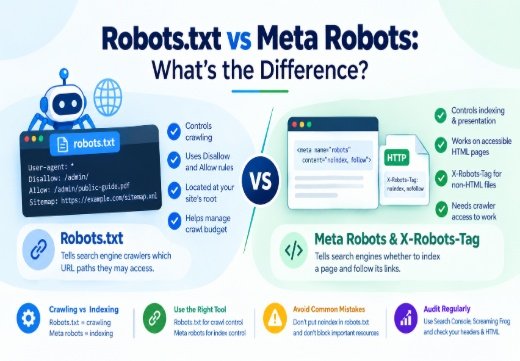
Robots.txt controls crawler access to paths and should not be used as a substitute for index control. Blocking a URL can prevent Google from seeing important resources or a noindex directive. For a page that should remain accessible but not appear in Search, use a crawlable noindex rule. For broader guidance, read robots.txt vs meta robots.
Crawl Budget matters mainly on very large or frequently updated sites. Duplicate URLs, faceted navigation, soft 404s, long redirect chains, and stale sitemaps can waste crawl resources.
Strengthen Navigation, Breadcrumbs, and Mobile Architecture
Make navigation useful on every device
Site Navigation should reflect your main categories. Use descriptive labels and connect the homepage to important hubs. Breadcrumb Navigation shows location and creates another internal-link path. Markup does not replace usable navigation.
Design for Mobile-First Indexing because Google uses mobile content for indexing and ranking. Keep primary content, headings, metadata, links, and robots directives equivalent across versions. Responsive design is usually easier to maintain.
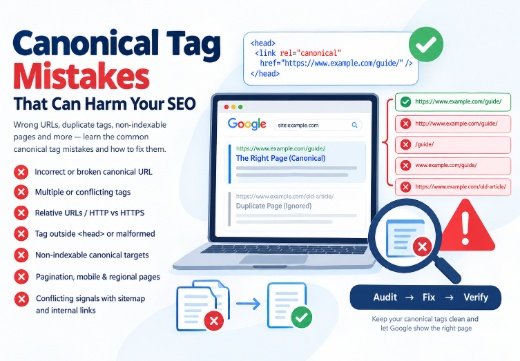
Canonical Tags matter when multiple URLs represent similar content. Point duplicates toward the preferred URL and keep canonical signals consistent with internal links and sitemaps. Review common canonical tag mistakes before a migration.
Audit and Improve Your Website Architecture for SEO
Use Crawl Data to Find Structural Problems in Website Architecture for SEO
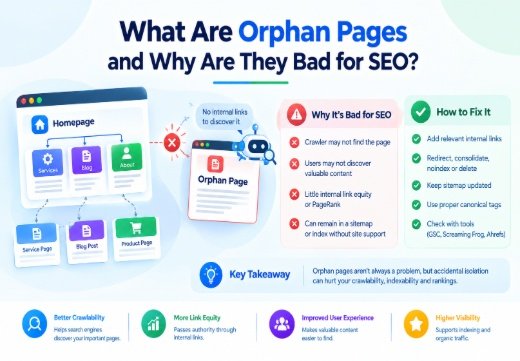
Begin with a URL inventory. Identify orphan pages, duplicate URLs, redirect chains, non-indexable templates, excessive Page Depth, and sections with few internal links. Map the hierarchy before changing URLs.
Use Google Search Console to review Page Indexing, sitemap processing, internal-link discovery, and URL Inspection results. Screaming Frog SEO Spider can visualize crawl depth, shortest paths, indexability, and directory structure.
Ahrefs Site Audit and SEMrush Site Audit can supplement the crawl with internal-link, redirect, orphan-page, and crawlability reports. Yoast SEO and Rank Math can manage sitemaps and canonical settings, but plugins cannot replace architecture.
For migrations, faceted navigation, rendering, or indexation problems, a Technical SEO Consultant can diagnose the system. Monitor Search Console after release.

Areesh Ishtiaq
Freelance SEO Professional helping businesses improve visibility across Google Search, Google Maps and AI-powered search.
Explore Areesh IshtiaqFrequently Asked Questions
A shallow, logical structure is usually the strongest starting point: homepage, focused categories, useful hubs, and related pages connected by crawlable internal links.
Keep important pages within a few meaningful clicks where practical. There is no universal Google limit, but excessive Page Depth can make discovery and navigation harder.
Topic clusters are not a required Google system. They can organize related content, strengthen internal linking, and clarify topical relationships when each page provides distinct value.
No. A sitemap helps discovery, but it does not replace crawlable navigation, relevant internal links, clear URLs, or indexable content.
Indexable pages often benefit from a self-referencing canonical; duplicates should point to the preferred representative. Canonicals should not replace redirects or noindex when those controls are appropriate.