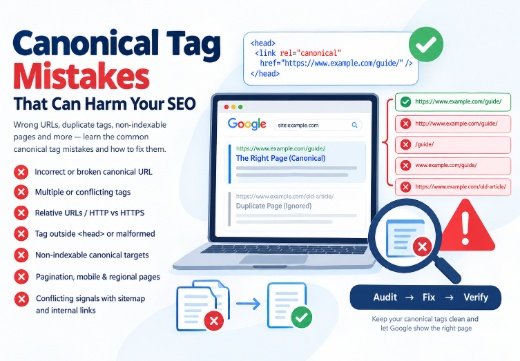
Canonical tag mistakes can prevent the right page from appearing in Google Search, split signals across duplicate URLs, or make Google ignore your preference. The main problems are an incorrect, broken, or non-indexable canonical URL multiple or conflicting rel=”canonical” declarations relative URLs, the wrong HTTP/HTTPS version, or a tag outside <head>; and canonicalizing unique pagination, mobile, or regional pages. The fix is to audit the URL structure, align internal links and XML sitemaps, and verify Google’s selected canonical.
Why Canonical Tag Mistakes Create SEO Problems
Incorrect Canonical URL and Broken Canonical URL
A rel canonical tells Google which URL best represents duplicate or similar content. It is a strong signal, not a command. One of the common Canonical Tag Mistakes is pointing a product page to an unrelated category, outdated article, or substantially different page, which may cause Google to ignore the canonical. The target should exist, match the source page’s main content, and be the URL you want displayed.
This creates a canonicalization problem: the wrong URL becomes preferred in the Search Index while the useful page is treated as duplicate content. Google, Bing, and other crawlers may surface the wrong URL in the Search Engine Index. Review after template or migration changes.
Multiple Canonical Tags: A Common Canonical Tag Mistake
A page should normally declare one canonical URL through a single implementation. Canonical Tag Mistakes, such as multiple canonical tags, duplicate declarations from an SEO plugin, or an HTML tag that conflicts with an HTTP header, can make the signal unpredictable. In such cases, Google may ignore the canonical signals altogether.
Inspect source: themes and plugins can insert a second tag. Remove Duplicate Canonical Tags and retain one accurate absolute rel=”canonical”.
Technical Canonical Implementation Errors
Relative URLs, URL Parameters, and HTTP-to-HTTPS mistakes
A canonical URL should use a fully qualified address such as https://www.example.com/guide/. A value like example.com/guide/ can be interpreted as a relative path, while /guide/ depends on the current URL and may create errors across templates. Google recommends absolute URLs to reduce ambiguity.
Check the domain version too. If the site uses HTTPS, do not publish an HTTP-to-HTTPS canonical that points to insecure URLs. Standardize protocol, hostname, capitalization, trailing slashes, and URL Parameters across canonicals, redirects, sitemaps, and internal links.
Wrong Placement or Malformed Implementation: Common Canonical Tag Mistakes
The HTML <link> Tag with rel=”canonical” belongs in <head>; a body tag may be disregarded. Invalid HTML, JavaScript overwrites, or a malformed href can prevent Googlebot from interpreting the URL.
For PDFs, use a canonical HTTP Header when appropriate. Do not publish HTML and HTTP Header canonicals with different destinations. Test the response received by search engine crawlers.
Non-Indexable Canonical Targets
Noindex, robots.txt, errors, and redirects
A non-indexable canonical points to a URL Google cannot index. Examples include a page blocked by robots.txt, a Noindex Tag, a 404/500 response, no response, or a redirected canonical returning 3xx. Screaming Frog classifies these as problems because signals are sent to an unstable representative.
Choose a relevant URL that returns 200 and is crawlable and indexable. Do not use robots.txt or noindex to consolidate duplicates. If an old URL moved permanently, a 301 Redirect is usually more appropriate.
Canonical Chains and Loops: Common Canonical Tag Mistakes
A canonical chain occurs when A points to B and B to C; a canonical loop points back to an earlier page. Both weaken the signal. Point each duplicate directly to one final canonical, then update links and sitemap entries.
Duplicate URL and Page-Structure Mistakes
Pagination and mobile URLs
Do not point every page in a unique paginated series to page one. Later pages may contain products, articles, or text that page one lacks, so canonicalizing them away can remove content from indexing. Give each valuable page an accurate canonical. Consolidate only when a complete “view all” page is genuinely equivalent.
For separate Mobile URLs, do not canonicalize to a missing, blocked, or incomplete desktop page. Confirm Google can access the preferred version and mobile-first indexing preserves important content and links.
Cross-domain canonicalization and regional pages
Cross-Domain Canonicalization should be deliberate. A copied or partner URL should not point to another domain merely because content is similar. Use a Self-Referencing Canonical for useful regional pages and add localization annotations.
Conflicting Canonical Signals: Common Canonical Tag Mistakes
Canonical versus sitemap and internal links
A canonical tag is one signal. If it points to A while an XML Sitemap, navigation, breadcrumbs, and Internal Linking point to B, Google may select B. Keep one URL across the tag, HTTP Header, redirects, sitemap, hreflang, and links. Sitemap inclusion is weaker than a redirect or rel=”canonical”.
Canonical versus robots.txt and noindex
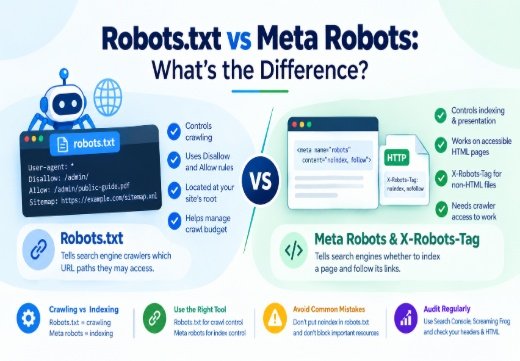
These controls are not interchangeable. Robots.txt manages crawling access; noindex asks Google not to show a page; a canonical selects the representative among duplicates. Using the wrong control creates canonicalization errors.
How to Find and Fix Canonicalization Errors
Google Search Console Diagnosis for Canonical Tag Mistakes
Use the URL Inspection Tool in Google Search Console to compare the user-declared and Google-selected canonical for the indexed version. If they differ, inspect duplicates, redirects, HTTPS, page quality, links, sitemaps, and server behavior. A live test does not guarantee indexing or predict the final choice.
After correction, request re-indexing for important URLs; do not repeatedly request it first.
Crawl and CMS verification
Use Screaming Frog SEO Spider to find missing, multiple, conflicting, relative, broken, redirected, and non-indexable canonicals. Check HTML <link> elements and HTTP Headers, then review templates, plugins, redirects, and mobile rules.
Read how Google discovers and indexes website pages and canonical tags for SEO. If the issue extends to crawling, rendering, architecture, or indexation, a Technical SEO Consultant can investigate the root cause.

Areesh Ishtiaq
Freelance SEO Professional helping businesses improve visibility across Google Search, Google Maps and AI-powered search.
Explore Areesh IshtiaqFrequently Asked Questions
Pointing an important page to an unrelated, broken, noindex, blocked, or redirected canonical can remove it from consideration. Correct the target and verify a crawlable 200 response.
Yes. Conflicting declarations make the preferred URL unclear, and Google may ignore them. Keep one accurate implementation per page.
Not when later pages contain unique products, articles, or text. Give each valuable page an accurate canonical unless a complete view-all page is genuinely equivalent.
No. Robots.txt controls crawling and can hide the signal. Use rel="canonical", redirects, sitemap consistency, or noindex according to the intended outcome.
Inspect the URL in Google Search Console and compare declared and selected canonicals. Then audit redirects, links, sitemaps, content similarity, and indexability.