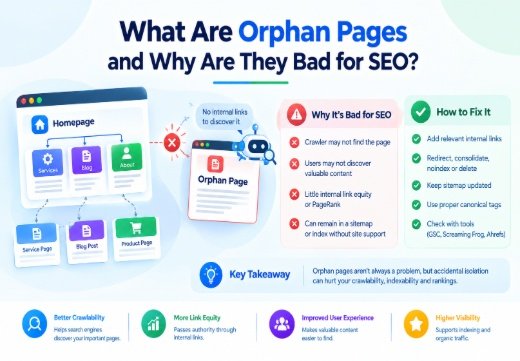
Orphan Pages are live URLs with no incoming Internal Linking from other pages on the same website. They can be harmful because a Crawler may have no path to discover them; users may not find valuable content; they receive little internal Link Equity or PageRank; and they can remain in a sitemap or Google’s index without site support. Decide whether each page is valuable, intentional, outdated, duplicated, or unnecessary.
What Are Orphan Pages?
Definition: no incoming internal links
An orphan page is a valid, published webpage that cannot be reached through crawlable internal links from normal starting points such as the homepage or primary navigation. It may still have backlinks, appear in an XML Sitemap, receive traffic, or be known to Google.
This differs from a dead-end page, which has incoming links but few useful outbound links. It also differs from a broken link: an orphan page may return a normal 200 status code.
How orphan pages are created
Orphan pages often appear after a migration, redesign, navigation change, URL restructuring, or content audit. Discontinued products, deleted category links, expired campaigns, testing pages, CMS templates, and forgotten posts are also common causes.
Some are intentional, such as paid landing pages or private campaign URLs. They still need an indexation decision because not linking to a page does not guarantee that search engines cannot discover it.
Why Orphan Pages Are Bad for SEO
They weaken crawlability and indexability
Search engines use links to discover URLs and understand relationships. When a valuable page has no internal link, Googlebot may not find it during normal crawling. It may be discovered through an XML sitemap or external backlink, but discovery and indexing are never guaranteed.
This weakens Crawlability and can delay Indexability. A page that is not indexed cannot earn organic visibility, and its purpose may be less obvious even after discovery.
They lose internal link equity and rankings
Internal links help establish information hierarchy and distribute Link Equity across a website. In Google’s original link-based systems, PageRank represents the importance of pages partly through links. An orphan page has no incoming internal path through which authority and contextual relevance can flow.
An orphan page is not automatically penalized or unable to rank. However, it often receives less organic traffic and remains disconnected from the user journey. At scale, orphans can contribute to index bloat, competing pages, and wasted crawl resources.
How to Find Orphan Pages
Compare crawl data with known URL sources
A normal crawler follows internal links, so compare crawl URLs with the XML sitemap, Google Search Console, analytics, server logs, backlinks, and CMS data.
Screaming Frog SEO Spider can combine a crawl with XML Sitemaps, Google Analytics, and Search Console data. Ahrefs Site Audit and SEMrush Site Audit provide similar comparisons.
Review Google Search Console and audit tools
Use Google Search Console to check pages receiving impressions or clicks with little internal support. Compare Page Indexing with the sitemap and crawl export. An indexed page with no internal link is still an orphan.
Ahrefs, SEMrush, Moz, and Sitebulb can add backlink, crawl-depth, and internal-link data. Moz Pro can identify crawl depth and broken internal links. Check each URL’s source before fixing it; a URL in a stale sitemap may be retired.
How to Fix Orphan Pages
Add relevant internal links
If the page is useful and intended for organic search, add contextual links from a relevant category, pillar article, service page, or navigation element. Use descriptive anchor text.
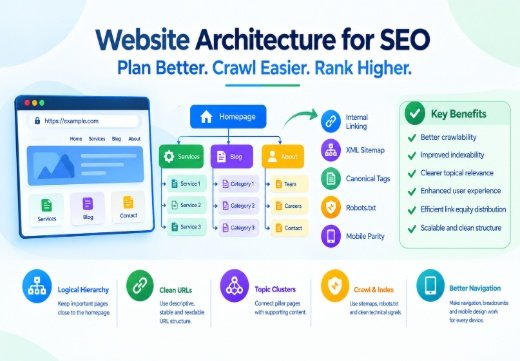
Confirm that the destination is indexable, returns a successful status, is not blocked by Robots.txt, and has no accidental Noindex directive. Update the XML Sitemap if the URL should appear in search. Read Website Architecture for SEO for broader guidance.
Redirect, consolidate, noindex, or delete
Do not add links merely to clear an audit warning. If the page duplicates a stronger URL, merge useful information and use a relevant 301 redirect. Redirect old URLs with valuable backlinks to the closest replacement.
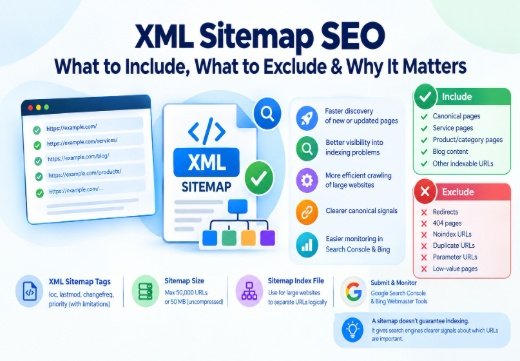
For an intentionally isolated campaign page, use a crawlable noindex directive when it should not appear in search. Delete pages with no legitimate value and return an appropriate 404 or 410 response. Review XML Sitemap SEO guidance to keep such URLs out of the sitemap.
Are All Orphan Pages a Problem?
Not necessarily. Intentional campaign or private-distribution pages can be valid. The problem is accidental isolation of pages that should support users, conversions, or organic search.
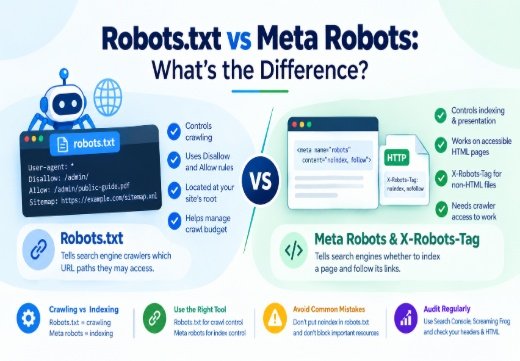
Keep and internally link valuable pages; consolidate duplicates; redirect replaced pages; noindex intentionally excluded pages; and delete content with no purpose. Do not use robots.txt to hide a page: a block can prevent Google from seeing noindex, while external discovery can still expose the URL.
Prevent Orphan Pages With Better Site Architecture
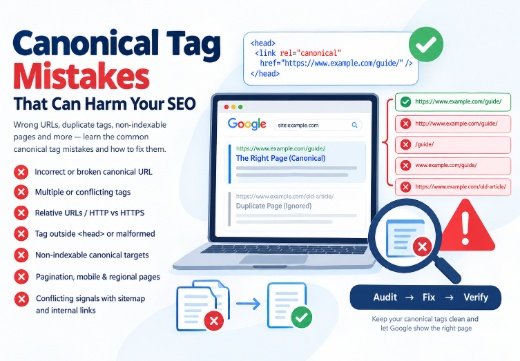
Include internal linking in publishing and migration workflows. Every important page should have a site-hierarchy destination, a crawlable internal link, a canonical tag where relevant, and accurate sitemap status. Update related links, redirects, and broken links when removing content.
Run a recurring Website Audit after redesigns, content updates, and catalog changes. Track orphan URLs, broken links, deep pages, redirects, and sitemap mismatches with Screaming Frog SEO Spider, Ahrefs Site Audit, SEMrush Site Audit, Moz Pro, or Sitebulb.
If orphan pages are symptoms of wider architecture, crawling, or indexation problems, a Technical SEO Consultant can diagnose the system and prioritize fixes based on page value.

Areesh Ishtiaq
Freelance SEO Professional helping businesses improve visibility across Google Search, Google Maps and AI-powered search.
Explore Areesh IshtiaqFrequently Asked Questions
Yes. Google may discover them through an XML sitemap, backlinks, analytics, or other sources, but indexing is not guaranteed.
No. Intentional campaign pages may be isolated by design. Accidental orphans containing valuable content, products, or services usually need attention.
Add a relevant internal link if it is valuable. Otherwise, consolidate and redirect it, use noindex, or delete it when it has no legitimate purpose.
No. A sitemap can help search engines discover an orphan URL, but it does not create an internal relationship, distribute link equity, or replace crawlable navigation.
Audit after migrations, redesigns, large content changes, and catalog updates. A recurring crawl is useful for larger sites because new orphans can appear whenever links or templates change.