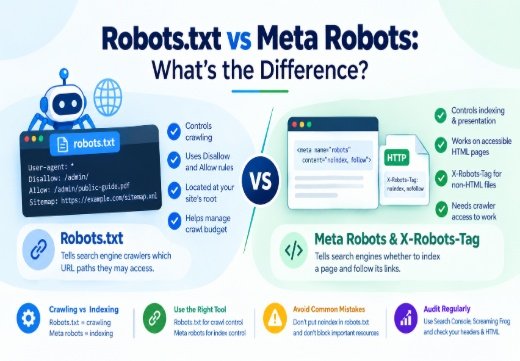
Robots.txt vs Meta Robots concerns two different layers of technical SEO. robots.txt controls whether a crawler may access URL paths; the robots meta tag controls indexing and search-result presentation on an accessible HTML page; X-Robots-Tag provides similar index directives through an HTTP response header, including for PDFs and images; and noindex works only when Googlebot or another crawler can access the resource and read it. Use robots.txt to manage crawling and meta robots to control indexation.
What Is the Difference Between Robots.txt and Meta Robots?
Robots.txt controls crawling
A robots.txt file is a plain-text file at a host’s root, such as https://example.com/robots.txt. It follows the Robots Exclusion Protocol and tells cooperative Search Engine Crawlers which URL paths they may request. Its main purpose is crawl management.
When comparing Robots.txt vs Meta Robots, a Disallow rule blocks access to a matching path, while Allow can permit a more specific path within a restricted area. These are crawl directives, not reliable index directives. A disallowed URL may still appear in Google Search if Google discovers it through links, even though Googlebot cannot fetch its content.
Meta robots controls indexing
The meta robots tag is an HTML instruction for one page. A common example is:
<metaname="robots"content="noindex, follow">
Here, noindex asks search engines not to include the page in their index, while follow allows crawlers to follow links. nofollow asks a crawler not to follow the page’s links. These index directives differ from robots.txt because the crawler must first access the page to read the tag.
Use name="robots" for all cooperative crawlers or a specific user-agent, such as googlebot.
How Does Robots.txt Work?
User-agent, disallow, and allow
A robots.txt file groups rules by user-agent:
User-agent: *

Disallow: /admin/

Allow: /admin/public-guide.pdf

Sitemap: https://example.com/sitemap.xml

The asterisk applies broadly. Separate groups can target Googlebot, Bingbot, or Yahoo’s Slurp. Google supports user-agent, allow, disallow, and sitemap fields and applies the most specific matching group.
Be precise with paths, capitalization, trailing slashes, and wildcards. A single Disallow: / can block the entire site.
Sitemap.xml and crawl scope
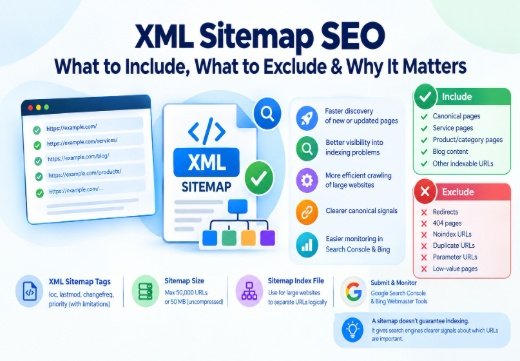
The sitemap.xml entry helps crawlers find your XML sitemap, but does not force crawling or indexing. List preferred URLs and exclude blocked or obsolete pages. Google, Bing, and other major engines support the Sitemap field.
Review each property in Google Search Console and Bing Webmaster Tools when managing multiple site versions.
How Do Meta Robots and X-Robots-Tag Work?
Noindex and nofollow
Use noindex when a page should not appear in search results. Use nofollow when you do not want a crawler to follow links on that page. They can be combined as noindex, nofollow, but noindex, follow is often better when the page should disappear while its links remain discoverable.
Index and follow are normally the defaults. A robots meta tag can also control snippets, previews, translations, and embedded indexing.
X-Robots-Tag for non-HTML files
The X-Robots-Tag is an HTTP response header that can express similar index directives without editing HTML:
X-Robots-Tag: noindex, nofollow
It is useful for PDFs, images, videos, and other non-HTML resources. Avoid contradictory values between meta robots and the HTTP header.
Robots.txt vs Meta Robots for SEO
When to Use Each Directive: Robots.txt vs Meta Robots
Use robots.txt for crawling control, such as excessive faceted URLs. Use meta robots noindex when an accessible page should not enter the Search Index.
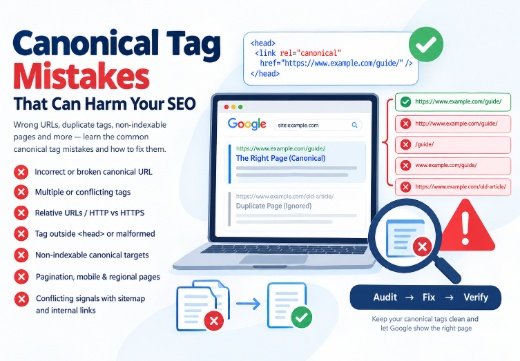
Use a 301 redirect when a URL has permanently moved. Use a canonical tag when duplicate pages must remain accessible but one URL is preferred. Canonicalization is not a substitute for robots.txt or noindex. For related guidance, read common canonical tag mistakes and canonical tags for SEO.
Why Blocking a Noindex Page Is a Mistake: Robots.txt vs Meta Robots
If robots.txt blocks a page, Google cannot reliably see its meta robots tag or X-Robots-Tag. The URL may remain in search results based on external links. To make noindex effective, allow Googlebot to crawl the page and request a recrawl after changes.
This distinction matters for Search Engine Optimization (SEO) because crawling and indexing are separate stages.
Common Robots Directive Mistakes: Robots.txt vs Meta Robots
A frequent error is placing noindex in robots.txt, which Google does not support. Other problems include blocking CSS or JavaScript needed to render a page, disallowing sitemap URLs, using the wrong user-agent, and assuming every crawler obeys the file.
Meta robots mistakes include adding noindex to production templates, using nofollow when you only wanted noindex, or applying a Google-specific rule when the goal includes Bing or Yahoo. Mozilla, Ahrefs, Moz, and SEMrush resources can help surface problems.
How to Audit and Fix Robots Directives
Use Google Search Console’s URL Inspection Tool to confirm whether Google can crawl a page, read its meta robots directive, and index the URL. Check Page Indexing for noindex or robots.txt exclusions. In Bing Webmaster Tools, review Bingbot reports. Inspect raw HTML and HTTP headers.
For larger sites, crawl with Screaming Frog SEO Spider. Check robots.txt, status codes, user-agent groups, meta robots, X-Robots-Tag, canonical tags, internal links, and XML sitemap URLs. WordPress users should review settings from Yoast SEO or Rank Math after template changes.
If a directive issue is part of a wider crawling, rendering, or architecture problem, a Technical SEO Consultant can investigate the root cause. Also see how Google discovers and indexes website pages to understand where crawl and index controls fit in Google Search.

Areesh Ishtiaq
Freelance SEO Professional helping businesses improve visibility across Google Search, Google Maps and AI-powered search.
Explore Areesh IshtiaqFrequently Asked Questions
Not reliably. It blocks crawling, but Google may still index a URL discovered through links. Use a crawlable noindex directive to exclude it.
Use noindex to exclude an accessible page. Use Disallow to manage crawler access. Do not block a page before Google can read its noindex rule.
nofollow asks a crawler not to follow links on a page. Disallow is a robots.txt rule asking crawlers not to request matching URL paths.
No. Use an X-Robots-Tag HTTP header for PDFs and other non-HTML resources because they do not contain an HTML .
Use Google Search Console and Bing Webmaster Tools, inspect HTML and HTTP headers, and crawl with Screaming Frog SEO Spider.